
The four methods for applying AI in your work
Four methods for applying AI in your work
AI can help you develop, manage and publish policies and procedures in several different ways.
The first is using a chatbot to answer questions about approved documents.
The second is using workflow automation to move information through a repeatable process.
The third is giving an AI agent a larger piece of work to complete.
The fourth is using AI to help create a purpose-built application.
These approaches can overlap, but they solve different problems.
- A chatbot answers questions.
- A workflow follows a defined process.
- An AI agent works towards a goal that may involve several steps.
- A purpose-built application gives people a repeatable tool with a clear interface.
Using a chatbot
A chatbot can help people ask questions about policies and procedures.
For example, you could create a chatbot that answers questions about your organisation’s information security policy.
We might give it this instruction:
“Answer questions using the supplied information security policy. If the policy does not provide an answer, say so. Include a reference that helps the user check the original source.”
We can then add the approved policy as a source.
It can also provide a link or reference to the original document.
You can include several related documents, such as:
- an information security policy,
- an acceptable-use policy,
- and the procedure for reporting an incident.
This gives people one place where they can ask questions across the collection.
Estimating example
You create an agent that uses your standard estimating spreadsheet as its knowledge base.
Ask it to calculate the time needed for each phase of a project, refining the estimate through a back-and-forth conversation.

A chatbot is useful when people need answers from approved information.
However, the chatbot isn’t the source of truth. The approved documents remain the source of truth.
Using workflow automation
The second approach is workflow automation.
A workflow is a series of connected steps.
For example, adding a new employee to a human resources system could start an onboarding process.
The event that starts the workflow is called a trigger.
The workflow might:
- prepare a document pack,
- send documents for signature,
- create an IT setup task,
- and remind a manager about required training.
Not every step needs AI. If a step always follows the same rule, ordinary automation may be more reliable.
For example, when a new employee is added, create an IT setup task.
AI may help when the workflow needs to interpret information that isn’t in a fixed format.
For example, it might read a job description and suggest which onboarding documents are relevant to that role.
The workflow could then ask a person to approve the selection.
Estimating example
An automated estimating workflow might look like this:
- The Project Manager publishes an Epic for a new project.
- An AI agent identifies the documentation tasks required.
- The agent estimates the time needed for each task.
- It sends a summary email to the project and documentation managers.
- The Documentation Manager reviews the estimates and assigns tasks to writers.

In this model, expertise is captured upstream in product engineering, in the Epic itself, rather than downstream in the documentation team. The writer’s role shifts from drafting to designing and governing the knowledge pipeline. Documentation becomes, in effect, a by-product of system state.
Use a workflow when the process is predictable and you can define what should happen at each stage.
Giving an AI agent a piece of work
The third approach is to give an AI agent a larger task.
This is different from asking a chatbot one question.
Tools installed on your machine such as Codex or ChatGPT Work can be able to read several files, compare information and create a finished report.
For example, imagine that you have a folder containing 20 policies.
You want to find out whether the documents use the same terms consistently.
You could ask the agent to:
- read the policies,
- identify terms that may have the same meaning,
- show where each term appears,
- and create a report of possible inconsistencies.
We might use this instruction:
“Review these policies for inconsistent terminology. Do not change the original files. Create a report showing each term, where it appears and a possible standard term. Put anything uncertain into a separate questions section.”
The agent can decide how to organise the work.
It might search the files, compare the results and create a table.
This differs from a workflow.
A workflow normally follows steps that have been defined in advance.
With agentic work, you provide a goal and boundaries, and the AI decides which steps to take within those boundaries.
![Terminal window showing a command line interface for Claude Code, responding to a user greeting.]() Estimating example
Estimating example
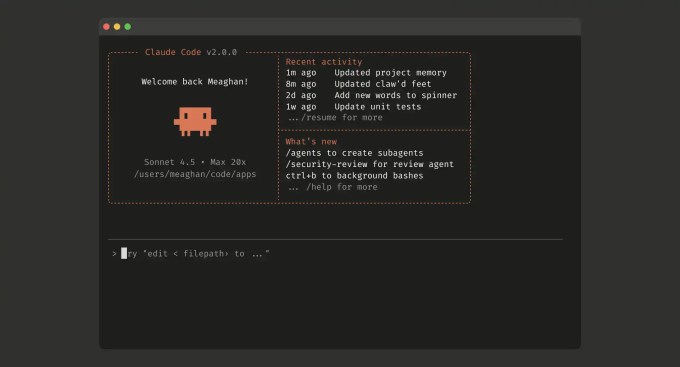
You instruct a command line AI agent to:
- Scan the codebase, API schemas, CLI commands, and recent pull requests to generate a “documentation scope map” listing all user-facing features that need coverage.
- Break that scope into discrete work units.
- Estimate complexity for each unit based on signals in the repository, such as the number of user-facing commands or screens.
- Generate a consolidated estimate, saved as a reusable workflow for future projects.
Use this approach when the work is too varied for a simple workflow but still produces something a person can review.
No-code AI app builders
The fourth approach is using AI to help create an application.
Two terms you may hear are vibe coding and no-code development.
With vibe coding, you describe the application you want and AI generates much of the code.
With a no-code tool, you build the application by selecting and connecting ready-made parts through a visual interface.
A purpose-built application can be useful when several people need to perform the same task in a consistent way.
It can provide:
- a simple interface,
- fixed input fields,
- the same checks each time,
- and a predictable form for the results.
Creating the first version is only part of the work. Before other people rely on an application, it still needs suitable security, accessibility, testing, maintenance and support.
Estimating example
You build an interactive estimating tool where users adjust sliders for factors like document scope, content complexity, and review cycles.
The app calculates and displays the projected timeline in real time.
![A dashboard for a User Guide Writing Estimation Tool with input factors and calculated results in hours and days.]() Good for
Good for

Teams that want something visually polished and easy for others to use.
Particularly effective for demonstrating AI’s value to senior management or non-technical stakeholders.
Limitations
Depending on your organisation, a standalone app may also need to go through cybersecurity review and change management.
So which method is best?
There is no single right answer. It depends on your team’s goals, technical confidence, and appetite for change.
- Use a chatbot when people need to ask questions about approved information.
- Use workflow automation when a predictable event should start a defined series of steps.
- Use an AI agent when you have a larger goal involving several files or stages.
- Use a purpose-built application when people need a repeatable tool with a clear interface.
You don’t always need the most advanced option.
Sometimes the best solution is a well-organised collection of documents, an ordinary search tool or a simple spreadsheet.
Start with the problem.
Then choose the simplest approach that can solve it safely.
0 comments